
Konter BRILink
Jualan produk toko campur sama layanan konter (tarik tunai, transfer, token, voucher), stok barang, sampai saldo kas di laci & bank sering kececer di banyak catatan? Upgrade ke sistem Web Appscript atau Website — dari omzet, laba konter, stok, sampai saldo akun kelacak rapi dalam satu sistem.Store product sales mixed with counter services (cash withdrawal, transfer, tokens, vouchers), stock, up to cash in the drawer & bank scattered across notes? Upgrade to a Web Appscript or Website system — revenue, counter profit, stock, up to account balances, all tracked neatly in one system.
waktunya update sistemtime to upgrade your system
Menyesuaikan dengan kompleksitas operasional Konter BRILinkBuilt for the operational complexity of a BRILink Counter
Makin rame transaksi, produk makin banyak, layanan konter numpuk, dan pencatatan pun makin kompleks. Tapi pengambilan keputusan tetap harus cepat dan akurat. Dengan sistem web, sistem kamu bisa : More transactions, more products, counter services piling up, and record-keeping getting more complex. Yet decisions still need to be fast and accurate. With a web system, yours can:
Owner, admin, staf akses bareng. Tiap input langsung kebaca yang lain.Owner, admin, staff access together. Every input is instantly visible to others.
Staf cuma input transaksi, owner lihat semua + laba. Aman.Staff only input transactions, owner sees everything + profit. Safe.
Nggak perlu buka laptop. Cukup link, langsung jalan di HP.No need for a laptop. Just a link, runs right on your phone.
Nggak ngetik di sel. Isi form yang rapi, minim salah ketik.No typing into cells. Fill neat forms, fewer typos.
Kita bahasLet's break it down
Solusi nya Case by CaseSolving it Case by Case
Gambaran teknis-teknis yang sering kejadian di konter BRILink & toko, diambil dari pengalaman-pengalaman pemilik konter lain.The technical situations that often come up in a BRILink counter & store, drawn from the experience of other counter owners.
1 PENJUALAN & LAYANANSALES & SERVICES
Jualan produk campur layanan konter, susah misahin untungnya?Product sales mixed with counter services, hard to split the profit?
Penjualan produk dan layanan konter (tarik tunai, transfer, PDAM, IndiHome, voucher game, cicilan) dicatat terpisah lengkap sama biaya admin dan fee bank. Profit tiap transaksi langsung kehitung, gak nyampur sama omzet produk.Product sales and counter services (cash withdrawal, transfer, PDAM, IndiHome, game vouchers, installments) are recorded separately, complete with admin fees and bank charges. Profit per transaction is computed instantly, kept apart from product revenue.
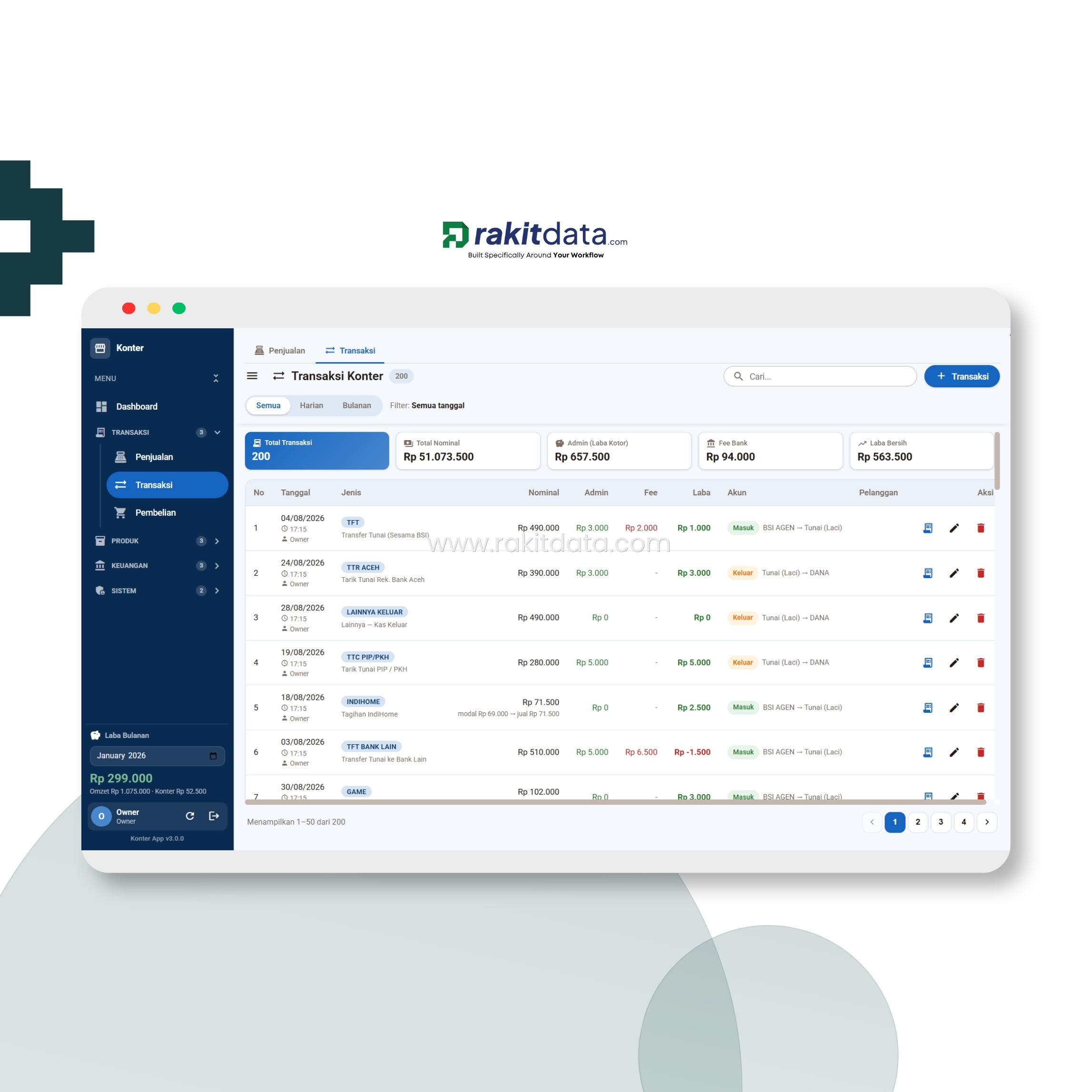
- Penjualan produk & layanan konter kepisah rapi.Product sales & counter services cleanly separated.
- Biaya admin & fee bank kecatat, profit per transaksi otomatis.Admin fees & bank charges recorded, profit per transaction automatic.
2 STOK & HARGASTOCK & PRICE
Stok barang sering ngaco, harga modal naik-turun gak kecatat?Stock often off, buy prices going up & down untracked?
Stok awal, masuk, keluar, dan akhir tiap produk dihitung otomatis dari pembelian dan penjualan, lengkap sama status perlu restock. Tiap perubahan harga modal/jual juga kecatat otomatis di Riwayat Harga — beserta sumber & user yang ngubah.Each product's opening, in, out, and closing stock is computed automatically from purchases and sales, with a restock-needed status. Every change to buy/sell price is auto-logged in Price History — including the source & the user who changed it.
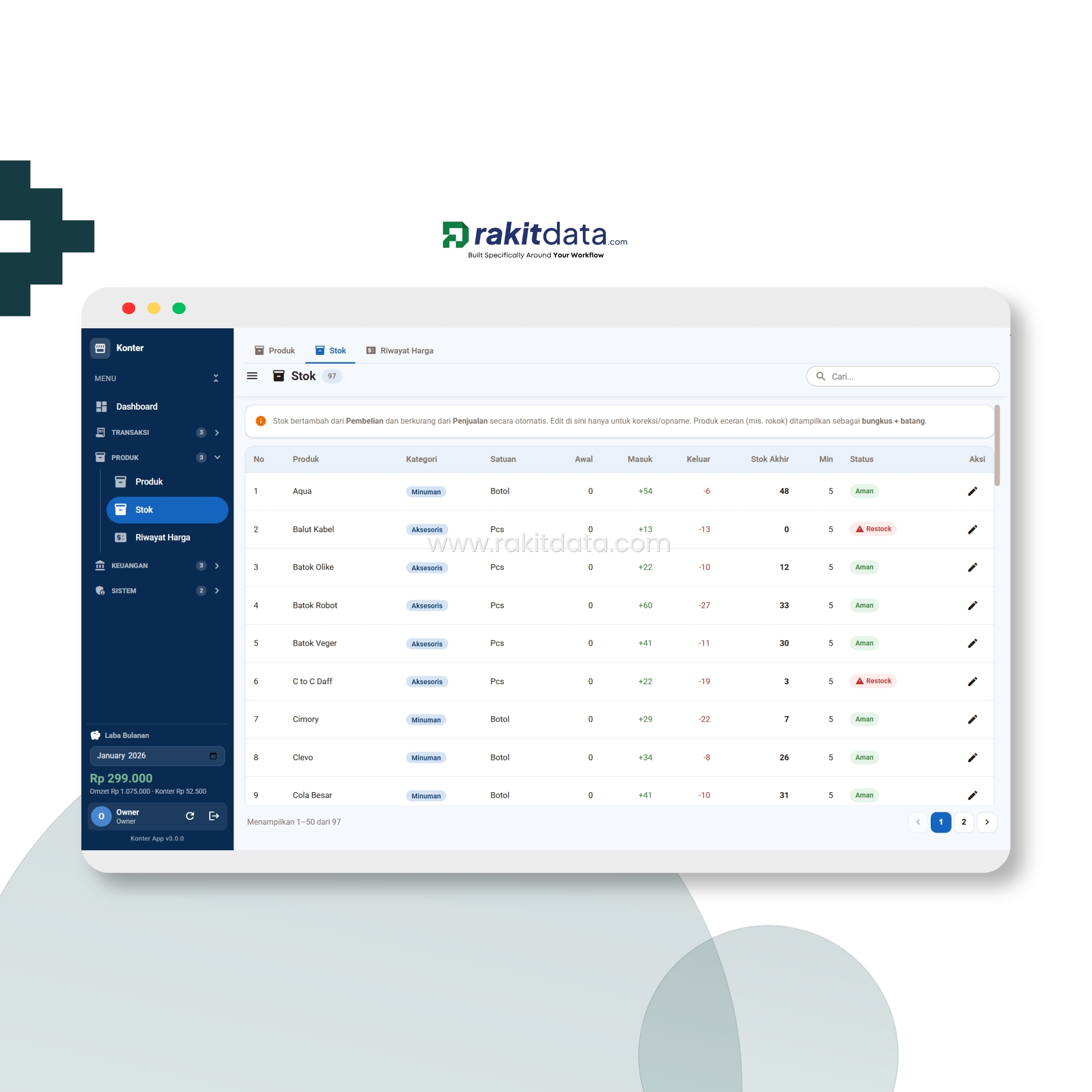
- Stok akhir otomatis dari pembelian & penjualan.Closing stock auto from purchases & sales.
- Status perlu restock & riwayat perubahan harga tersimpan.Restock-needed status & price-change history saved.
3 SALDO & KASBALANCE & CASH
Uang di laci, bank, sama e-wallet campur, saldo gak ketauan?Cash in the drawer, bank & e-wallet mixed, balance unclear?
Saldo tunai di laci, bank, dan e-wallet kepantau masing-masing, lengkap sama total aset, piutang, dan titipan. Tiap transaksi langsung nyesuain saldo, plus ada riwayat saldo harian — jadi gak ada lagi uang yang "ilang" gak jelas.Cash in the drawer, bank, and e-wallet are each tracked, complete with total assets, receivables, and deposits. Every transaction adjusts the balance instantly, plus a daily balance history — so no more money mysteriously "disappearing".

- Saldo laci, bank & e-wallet kepantau per akun.Drawer, bank & e-wallet balances tracked per account.
- Total aset, riwayat saldo harian tersimpan.Total assets & daily balance history saved.
4 PINJAMAN & TITIPANLOANS & DEPOSITS
Sering ngutangin orang & nerima titipan, lupa catet?Often lending to people & holding deposits, forget to record?
Uang yang dipinjam orang (piutang) dan titipan uang orang kecatat rapi, lengkap sama jumlah terbayar, sisa, dan status lunasnya. Gak ada lagi piutang nyangkut atau titipan ketuker.Money lent to people (receivables) and money held in trust are recorded neatly, complete with amount paid, remaining, and settlement status. No more stuck receivables or mixed-up deposits.
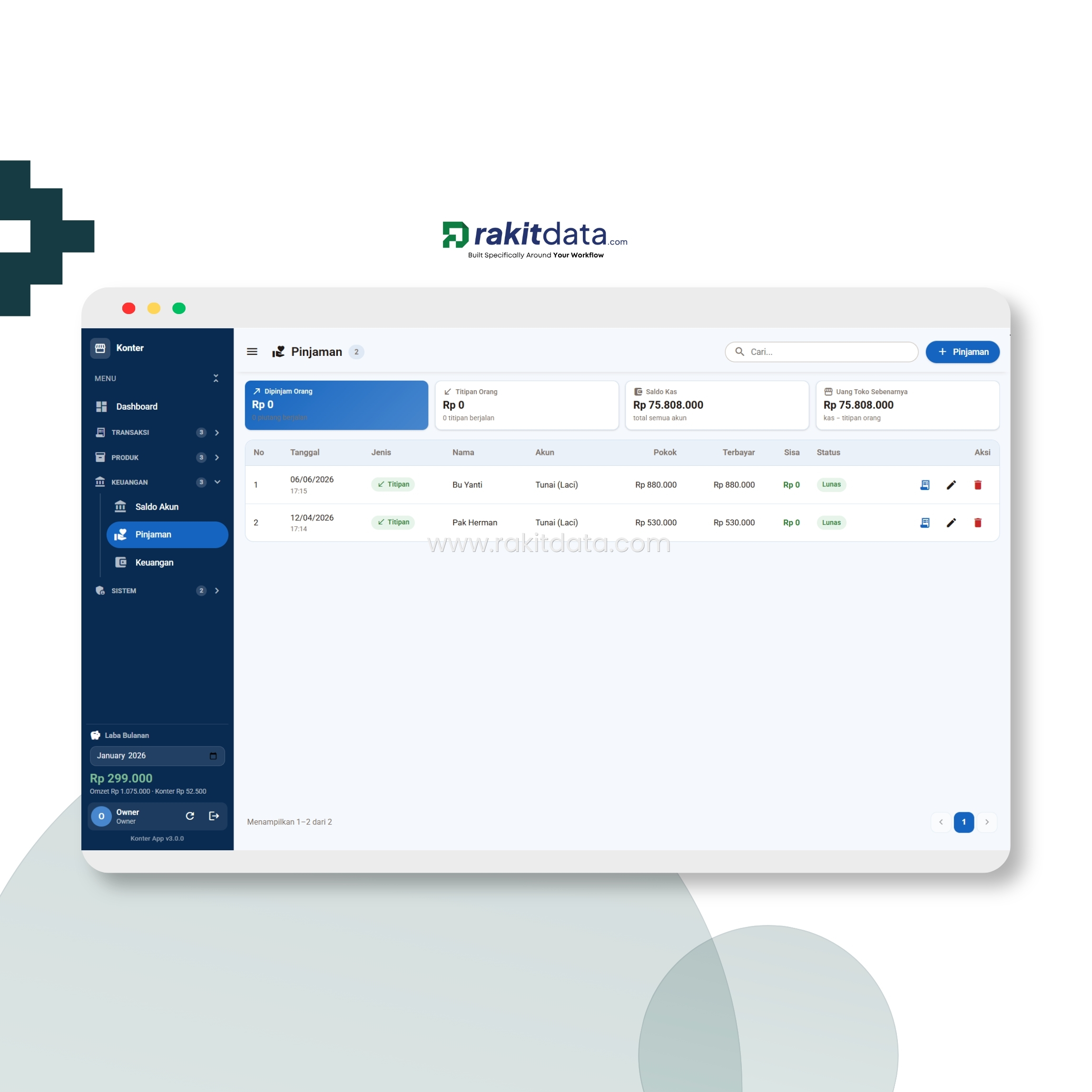
- Piutang & titipan kecatat: terbayar, sisa, status lunas.Receivables & deposits logged: paid, remaining, settled status.
- Gak ada lagi piutang nyangkut atau titipan ketuker.No more stuck receivables or mixed-up deposits.
5 HASIL AKHIRTHE RESULT
Udah rajin catet, terus diapain?You've recorded diligently — now what?
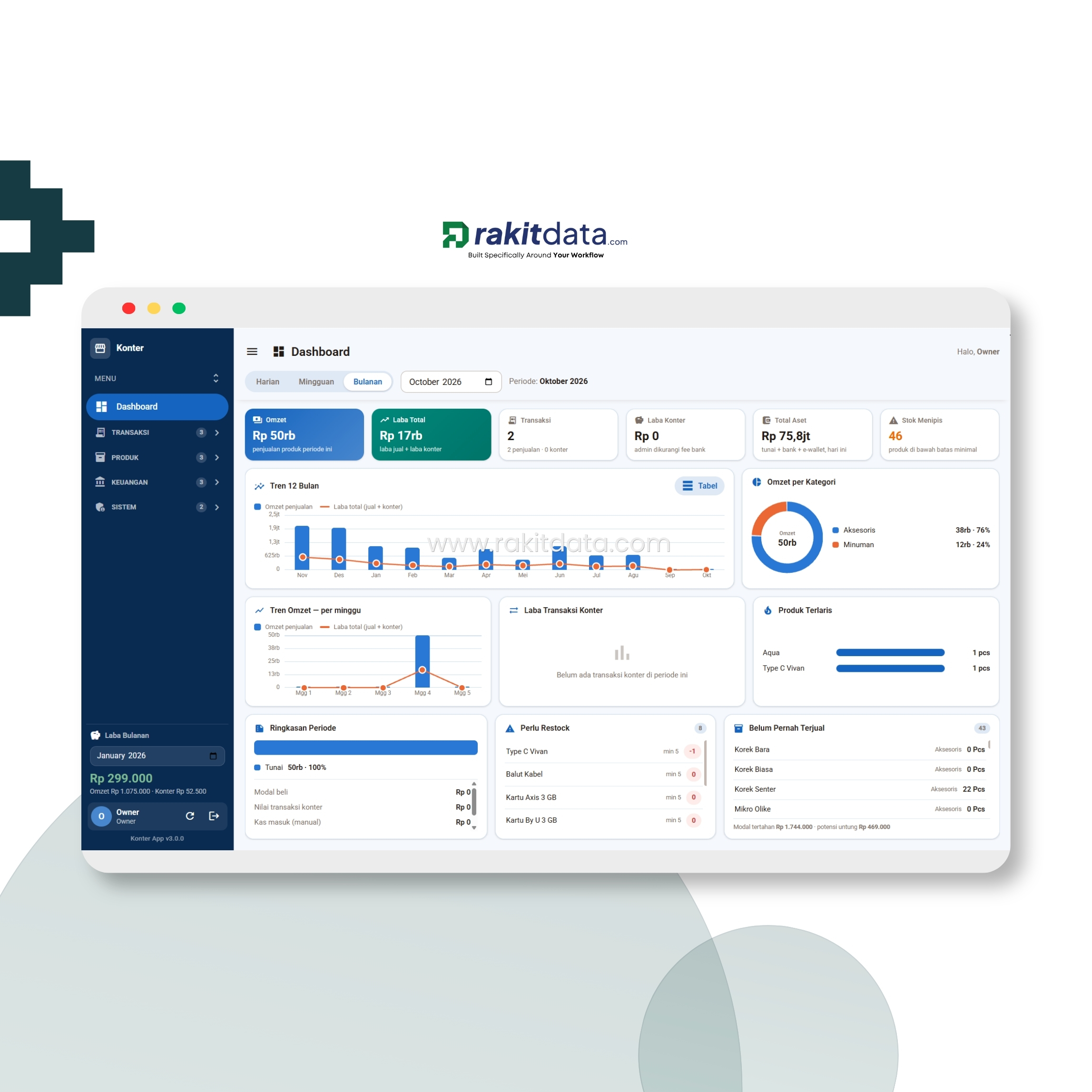
Semua yang dicatat tadi naik otomatis jadi dashboard: omzet, laba, laba konter, total aset, stok menipis, tren 12 bulan, sampai produk terlaris per periode — semua dalam satu layar. Data mentah berubah jadi bahan keputusan.Everything recorded rolls up automatically into a dashboard: revenue, profit, counter profit, total assets, low stock, a 12-month trend, up to best-selling products per period — all on one screen. Raw data becomes decision material.
- Omzet, laba konter, stok menipis & produk terlaris dalam 1 layar.Revenue, counter profit, low stock & best-sellers on 1 screen.
- Keputusan makin clear — produk mana distok, harga mana dinaikin, by data.Clearer decisions — what to restock, which price to raise, by data.
← Geser untuk lihat case lainnya →← Swipe for other cases →
1 LANGKAH 1STEP 1
Masuk sesuai peranSign in by role
Owner, admin, atau staf masuk pakai akunnya sendiri. Begitu login, hak aksesnya langsung ke-set sesuai perannya.Owner, admin, or staff signs in with their own account. On login, access is set automatically by role.
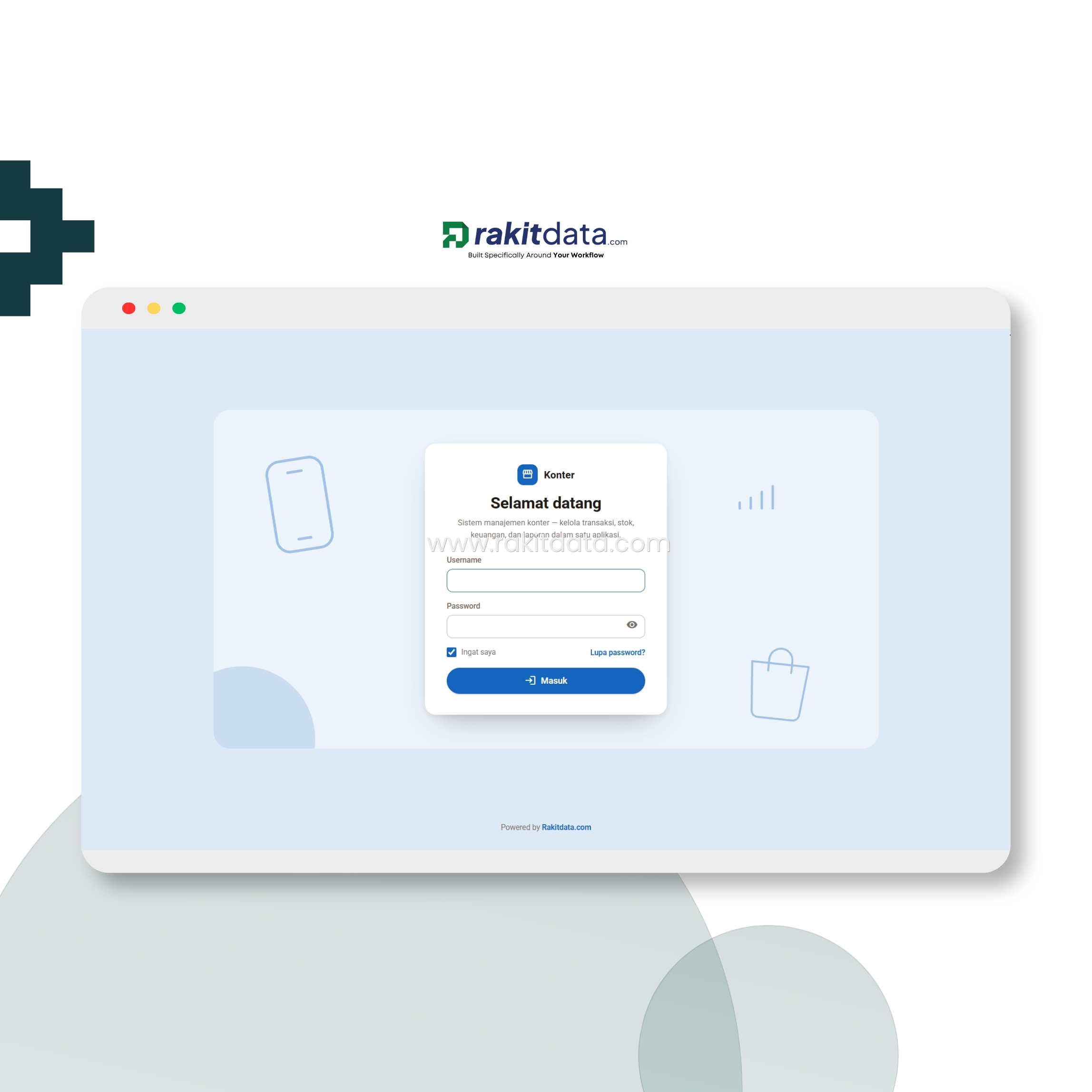
- Hak akses ke-set otomatis sesuai peran.Access set automatically by role.
2 LANGKAH 2STEP 2
Atur pengaturan & hak aksesSet permissions & access
Atur hak akses menu per role, master data, jenis transaksi & tarif layanan — sekali set, sistem langsung ngikutin.Set menu access per role, master data, transaction types & service rates — set once, the system follows.

- Hak akses, jenis transaksi & tarif diatur sekali.Access, transaction types & rates set once.
3 LANGKAH 3STEP 3
Isi data tokoFill store data
Masukin info toko, akun kas (laci/bank/e-wallet), dan data awal lainnya — langsung keintegrasi ke semua menu.Enter store info, cash accounts (drawer/bank/e-wallet), and other initial data — instantly integrated into every menu.
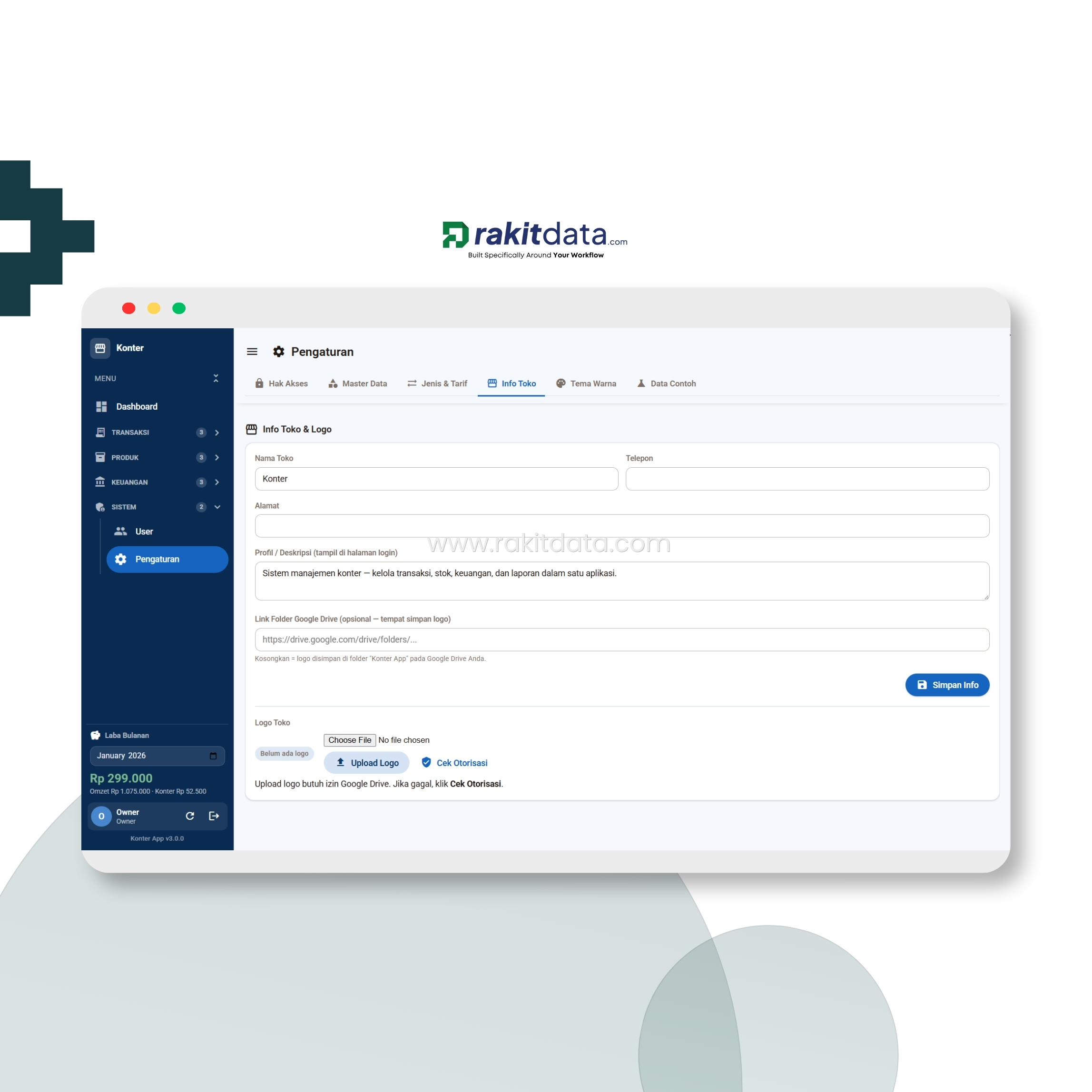
- Info toko & akun kas keintegrasi otomatis.Store info & cash accounts auto-integrated.
4 LANGKAH 4STEP 4
Atur tampilanSet the appearance
Sesuaikan tema warna dan tampilan aplikasi biar pas sama identitas konter kamu.Adjust the color theme and app appearance to match your counter's identity.
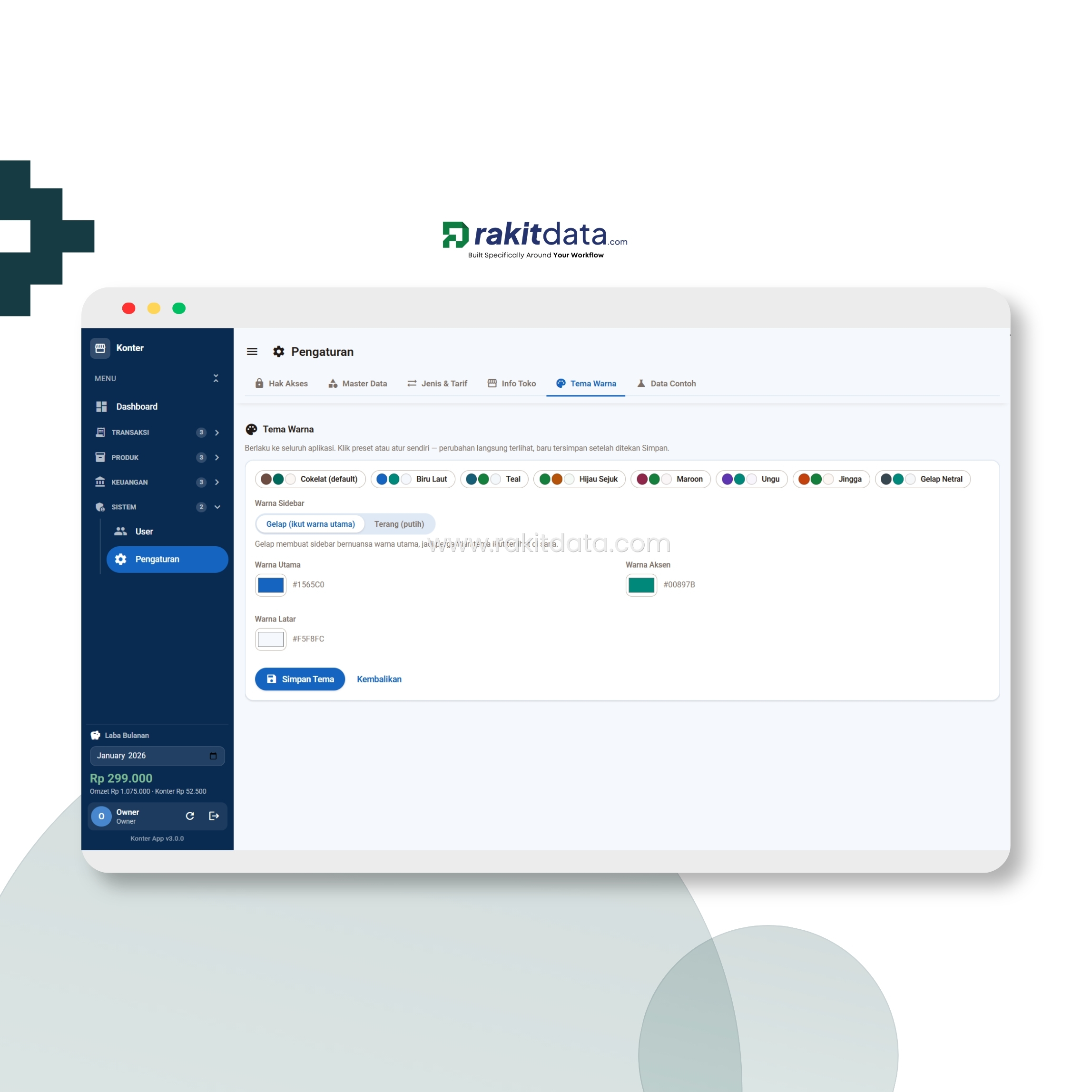
- Tema & tampilan bisa disesuaikan.Theme & appearance can be customized.
5 LANGKAH 5STEP 5
Kelola produkManage products
Atur data produk: kategori, satuan, harga modal, harga jual, untung per pcs, stok minimum, sampai harga eceran.Set product data: category, unit, buy price, sell price, profit per piece, minimum stock, up to retail price.
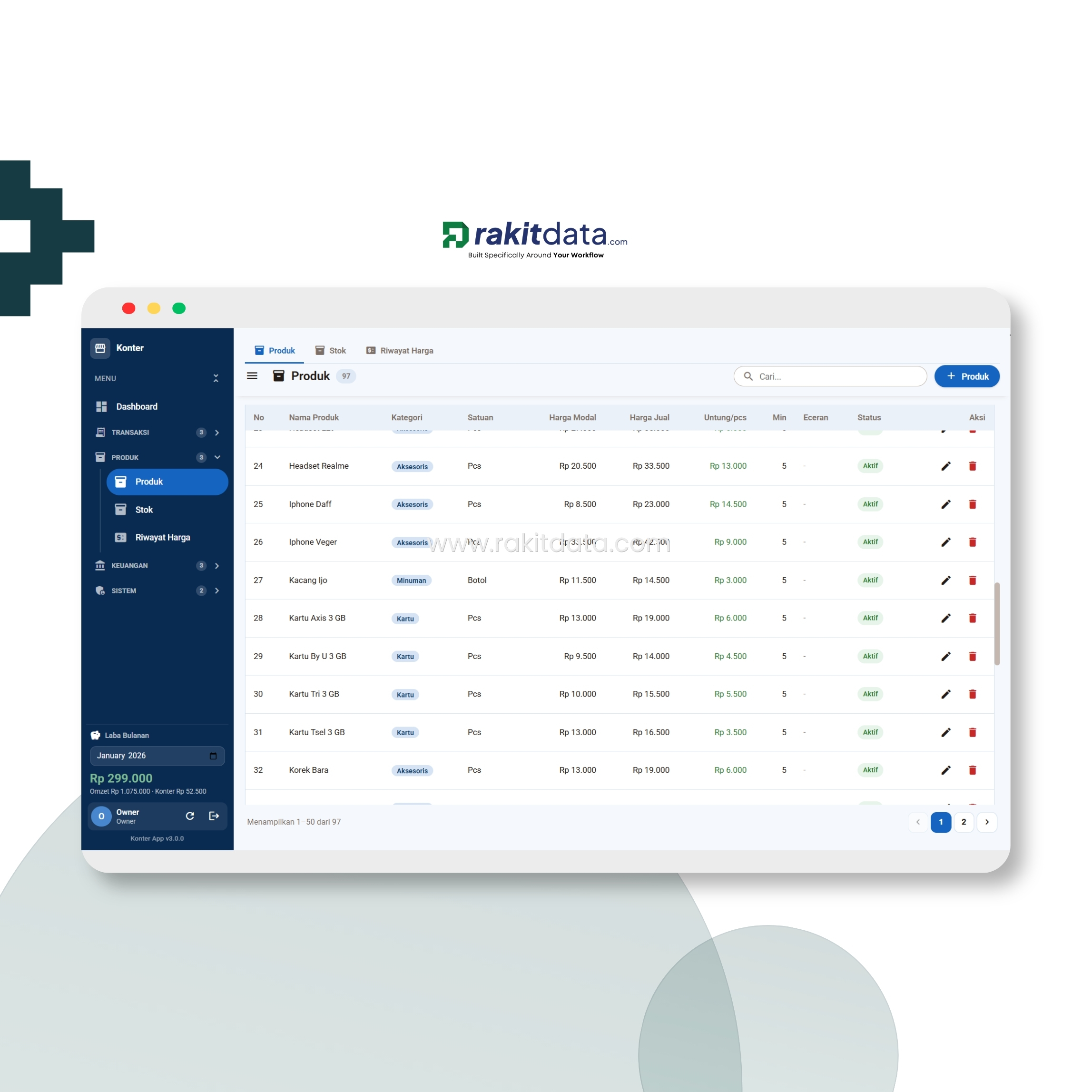
- Harga modal/jual, untung/pcs & stok minimum per produk.Buy/sell price, profit/pc & min stock per product.
6 LANGKAH 6STEP 6
Catat pembelian / restockRecord purchases / restock
Catat pembelian stok barang: qty, satuan, harga modal, dan sumber dana pembayarannya. Stok otomatis nambah.Record stock purchases: qty, unit, buy price, and the fund source. Stock increases automatically.
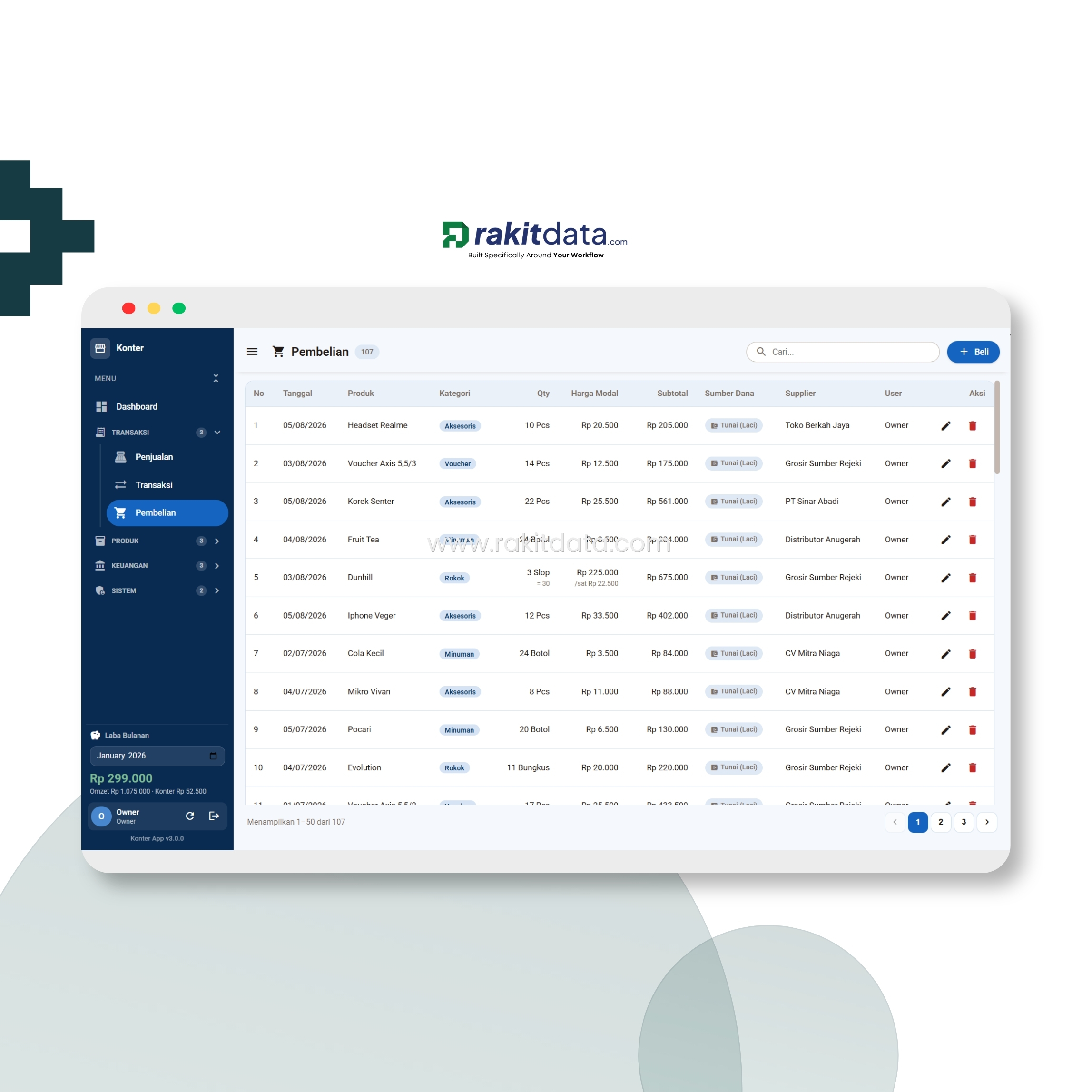
- Stok nambah otomatis, sumber dana kecatat.Stock auto-added, fund source recorded.
7 LANGKAH 7STEP 7
Catat penjualanRecord sales
Catat penjualan produk per invoice: qty, harga, diskon, dan profit. Bisa difilter harian atau bulanan.Record product sales per invoice: qty, price, discount, and profit. Filter by day or month.
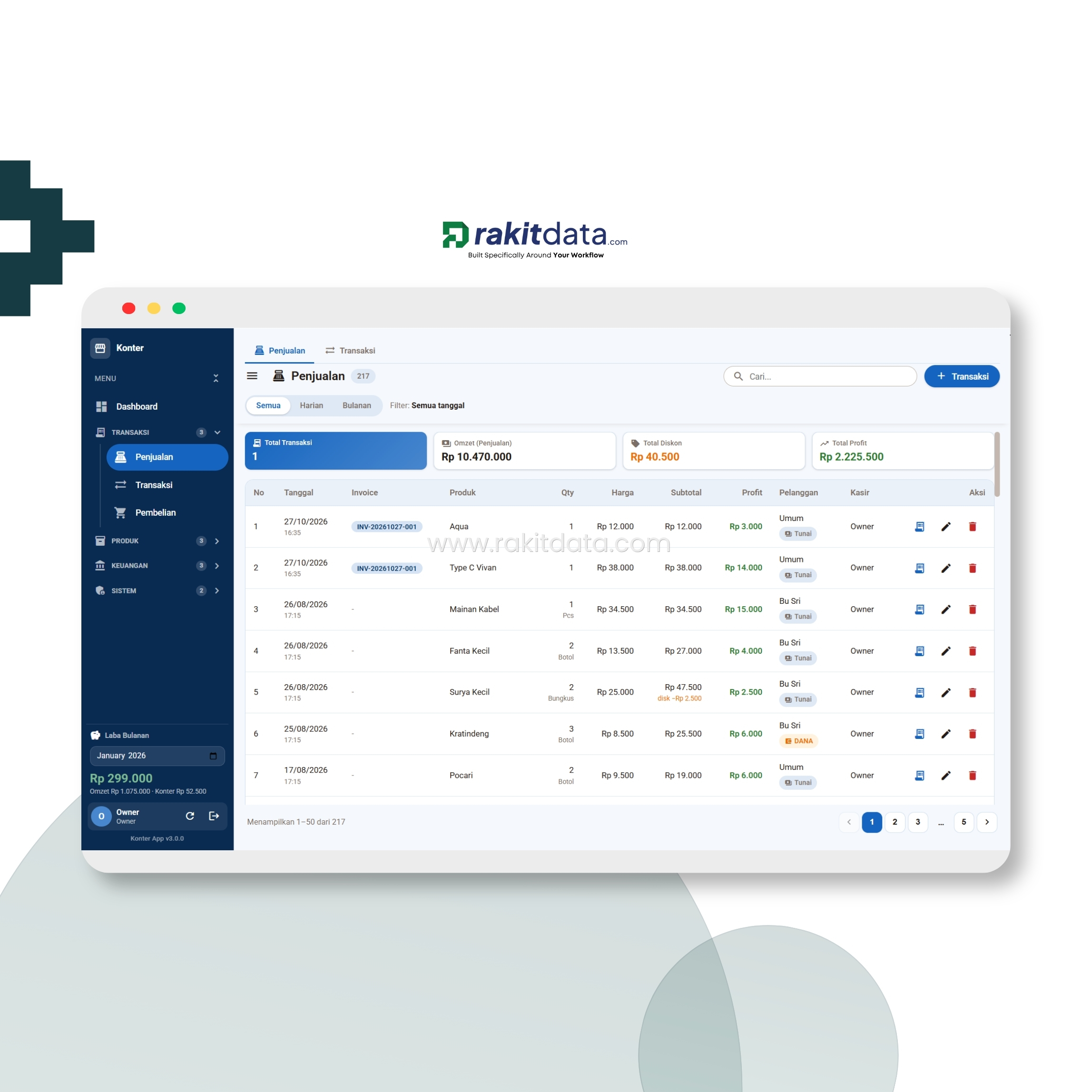
- Per invoice: qty, diskon & profit kehitung otomatis.Per invoice: qty, discount & profit auto-computed.
8 LANGKAH 8STEP 8
Catat transaksi layananRecord service transactions
Catat layanan konter: tarik tunai, transfer, tagihan PDAM & IndiHome, voucher game, cicilan — lengkap sama biaya admin dan fee bank.Record counter services: cash withdrawal, transfer, PDAM & IndiHome bills, game vouchers, installments — complete with admin fees and bank charges.
- Biaya admin & fee bank kecatat per layanan.Admin fees & bank charges recorded per service.
9 LANGKAH 9STEP 9
Pantau stokMonitor stock
Stok awal, masuk, keluar, dan akhir tiap produk kehitung otomatis dari pembelian & penjualan, lengkap sama status perlu restock.Each product's opening, in, out, and closing stock is auto-computed from purchases & sales, with a restock-needed status.
- Stok akhir & status restock otomatis.Closing stock & restock status automatic.
10 LANGKAH 10STEP 10
Cek riwayat hargaCheck price history
Tiap perubahan harga modal dan harga jual kecatat otomatis — beserta sumber perubahan dan user yang ngubahnya.Every change to buy price and sell price is auto-logged — including the source of the change and the user who made it.

- Perubahan harga + sumber + user tersimpan.Price changes + source + user saved.
11 LANGKAH 11STEP 11
Catat pinjaman & titipanRecord loans & deposits
Catat uang yang dipinjam orang (piutang) dan titipan uang, lengkap sama jumlah terbayar, sisa, dan status lunasnya.Record money lent to people (receivables) and money held in trust, with amount paid, remaining, and settlement status.
- Piutang & titipan: terbayar, sisa & status lunas.Receivables & deposits: paid, remaining & settled.
12 LANGKAH 12STEP 12
Catat keuanganRecord finances
Catat kas masuk dan keluar di luar penjualan — biaya operasional, setoran tunai, dll — lengkap sama ringkasan omzet & profit dan saldo tiap akun.Record cash in and out beyond sales — operating costs, cash deposits, etc. — with a revenue & profit summary and each account's balance.
- Kas luar penjualan & saldo akun kepantau.Non-sales cash & account balances tracked.
13 LANGKAH 13STEP 13
Pantau semua di dashboardMonitor it all on the dashboard
Semua data dari langkah tadi naik otomatis jadi dashboard: omzet, laba, laba konter, total aset, stok menipis, tren 12 bulan, sampai produk terlaris — satu layar.Everything from the steps above rolls up automatically into a dashboard: revenue, profit, counter profit, total assets, low stock, a 12-month trend, up to best-sellers — one screen.
- Ambil keputusan dari 1 panel ringkas.Decide from one concise panel.
← Geser untuk lihat tahapan lainnya →← Swipe for other steps →
Akses bertingkatTiered access
Tiap peran punya tingkatan aksesnya sendiriEach role has its own access level
Satu sistem, dengan batasan penting mengenai data.One system, with the right limits on data.
- Monitoring seluruh data konterMonitor all counter data
- Laba, laba konter & profit per periodeProfit, counter profit & profit per period
- Saldo akun, total aset & piutangAccount balances, total assets & receivables
- Atur batasan akses akun lainSet access limits for other accounts
- Kelola penjualan & transaksi layananManage sales & service transactions
- Catat pembelian & kelola stokRecord purchases & manage stock
- Keuangan, pinjaman & titipanFinance, loans & deposits
- Kelola produk & hargaManage products & prices
- Input penjualan & transaksi harianInput daily sales & transactions
- Lihat produk, harga & stokView products, prices & stock
- Tanpa akses laba & pengaturanNo access to profit & settings
← Geser untuk lihat peran lainnya →← Swipe for other roles →
kendala SistemSystem concerns
Yang sering kejadian, dan bisa kami antisipasiCommon situations we already anticipate
Flexibilitas sistem yang sudah dipikirikan dengan detail dari pengalaman.System flexibility thought through in detail from experience.
Ganti staf / admin baru?New staff / admin?
Tinggal bikin akun baru buat staf/admin, nonaktifin yang lama. Semua data & histori aman, nggak ikut kehapus.Just create a new account for the staff/admin and deactivate the old one. All data & history stay safe, nothing gets deleted.
Takut data bocor?Worried about data leaks?
Sistem hosting mandiri dan penerapan security yang maksimal sudah di terapkan pada tahap development.Self-managed hosting and strong security are applied from the development stage.
Merasa rumit dengan penggunaan?Feels complicated to use?
Setiap alur telah memiliki depedensi yang jelas, dan saling berkaitan. Kami menyiapkan pelatihan penggunaan agar sistem dapat digunakan dengan maksimal.Every flow has clear, connected dependencies. We provide usage training so the system is used to its fullest.
Pilih VersiChoose a Version
Dua opsi sistem, pilih yang paling sesuaiTwo system options, pick what fits best
Pembeda yang signifikan hanya di storage dan pengembangan jangka panjang. Pilih sesuai dengan kondisi operasional bisnis kamu saat ini. The key difference is only in storage and long-term development. Pick based on your current operational scale.
Web Appscript
Cocok untuk jangka pendek.Great for the short term.
- Tanpa Hosting dan DomainNo hosting & domain
- Basis data SpreadsheetsSpreadsheet database
- kapasitas ±50–100 MB±50–100 MB capacity
- Login Bertingkat (maksimal 10 pengguna)Multi-level login (up to 10 users)
- Tanpa biaya langgananNo subscription fee
- Akses dari HP & laptopAccess from phone & laptop
- 1 jam zoom pendampingan 2×2× 1-hour Zoom guidance
- Free penyesuaian minorFree minor adjustments
Website
Cocok untuk jangka panjangGreat for the long term
- Domain .com.com domain
- Gratis hosting + domain tahun pertamaFree hosting + domain for year one
- Database SQL · kapasitas 10 GBSQL database · 10 GB capacity
- Login bertingkatMulti-level login &
- multi-cabang (maksimal 3)Multi-level login & multi-branch (max 3)
- Buku panduan pemakaianUser manual
- 3x zoom pendampingan3× Zoom guidance
- Maintenance prioritasPriority maintenance
- Bonus 1 halaman landing pageBonus 1 landing page
Masing-masing fitur dan batasan dapat di sesuaikan kembali dengan kebutuhan anda. Diskusikan lebih lanjut via whatsapp.Every feature & limit can be tailored to your needs. Let's discuss further via WhatsApp.
Gak cuma konsepNot just a concept
Tapi udah dipakai atur konter beneranIt already runs real counters
Dari yang pakai versi Webapp sampai yang pakai Website — ini cerita mereka.From Webapp users to Website users — here are their stories.
Dulu jualan produk sama layanan BRILink kecatet jadi satu, untungnya gak keliatan. Sekarang kepisah rapi, laba konter sama laba toko masing-masing jelas.Product sales and BRILink services used to be recorded together, with profit invisible. Now they're cleanly split — counter profit and store profit each clear.
Pak Sugeng
★★★★★ · Konter BRILinkBRILink counter · Webapp
Saldo laci, bank, sama e-wallet dulu sering beda sama catatan. Sekarang tiap transaksi langsung nyesuain saldo, jadi gak ada lagi selisih yang bikin pusing.Drawer, bank, and e-wallet balances used to differ from my notes. Now every transaction adjusts the balance instantly, so no more confusing discrepancies.
Bu Wati
★★★★★ · Konter + sembakoCounter + grocery · Webapp
Yang paling kebantu stok otomatis. Barang masuk dari pembelian, keluar dari penjualan, langsung kehitung. Ada notif juga pas stok mau abis.Automatic stock helps the most. Goods in from purchases, out from sales, computed instantly. There's a notice too when stock is running low.
Pak Hendra
★★★★★ · Konter pulsaPhone-credit counter · Webapp
Sering ngutangin pelanggan sama nerima titipan, dulu gampang lupa. Sekarang kecatat rapi, sisa & status lunasnya keliatan jelas.I often lend to customers and hold deposits, and used to forget easily. Now it's recorded neatly — remaining & settled status clearly visible.
Bu Yuni
★★★★★ · Konter BRILinkBRILink counter · Webapp
Ambil versi website buat 3 cabang konter. Semua cabang kepantau dari satu dashboard, laba tiap cabang keliatan tanpa harus telpon satu-satu.Took the website version for 3 counter branches. All branches tracked from one dashboard, each branch's profit visible without calling one by one.
Pak Asep
★★★★★ · 3 cabang konter3 counter branches · Website
Dulu jualan produk sama layanan BRILink kecatet jadi satu, untungnya gak keliatan. Sekarang kepisah rapi, laba konter sama laba toko masing-masing jelas.Product sales and BRILink services used to be recorded together, with profit invisible. Now they're cleanly split — counter profit and store profit each clear.
Pak Sugeng
★★★★★ · Konter BRILinkBRILink counter · Webapp
Saldo laci, bank, sama e-wallet dulu sering beda sama catatan. Sekarang tiap transaksi langsung nyesuain saldo, jadi gak ada lagi selisih yang bikin pusing.Drawer, bank, and e-wallet balances used to differ from my notes. Now every transaction adjusts the balance instantly, so no more confusing discrepancies.
Bu Wati
★★★★★ · Konter + sembakoCounter + grocery · Webapp
Yang paling kebantu stok otomatis. Barang masuk dari pembelian, keluar dari penjualan, langsung kehitung. Ada notif juga pas stok mau abis.Automatic stock helps the most. Goods in from purchases, out from sales, computed instantly. There's a notice too when stock is running low.
Pak Hendra
★★★★★ · Konter pulsaPhone-credit counter · Webapp
Sering ngutangin pelanggan sama nerima titipan, dulu gampang lupa. Sekarang kecatat rapi, sisa & status lunasnya keliatan jelas.I often lend to customers and hold deposits, and used to forget easily. Now it's recorded neatly — remaining & settled status clearly visible.
Bu Yuni
★★★★★ · Konter BRILinkBRILink counter · Webapp
Ambil versi website buat 3 cabang konter. Semua cabang kepantau dari satu dashboard, laba tiap cabang keliatan tanpa harus telpon satu-satu.Took the website version for 3 counter branches. All branches tracked from one dashboard, each branch's profit visible without calling one by one.
Pak Asep
★★★★★ · 3 cabang konter3 counter branches · Website
Siap rapiin sistem konter kamu?Ready to tidy up your counter system?
Diskusiin kebutuhan sistem Konter BRILink kamu — kami bantu rancang & buatin sistemnya.Tell us what your BRILink Counter system needs — we'll help design & build it.